How to Use Klaviyo's New AI (Composer) to Build Flows
A practical, human-reviewed workflow for using Klaviyo Composer to draft flows and campaigns without handing strategy or QA to AI.
- Configure the required platform and data foundation
- Verify the setup before increasing send volume
What is Klaviyo Composer?
Composer is an AI-assisted builder inside Klaviyo. Give it a clear brief and it can draft a flow or campaign structure, content, and design direction. Feature availability and output can change as Klaviyo updates the product, so verify the controls in your account before making it part of a production workflow.
The useful question is not whether it replaces a lifecycle marketer. It is where a generated draft removes blank-page work and where a human still needs to make the decision.
Composer can produce a draft skeleton: a proposed trigger, delays, and message copy. It does not validate your offer, brand voice, audience logic, consent, or QA. Treat every generated setting as a proposal, direct it with a specific brief, and review it before publishing.
What can Composer actually build?
It builds two things: flows and campaigns. Flows are where it gets interesting, because the structure of a good flow (the trigger, the delays between sends, one clear job per email) is exactly the repetitive setup work AI is good at.
For a flow, one prompt gets you a trigger on the front, time delays already set between sends, and draft subject lines, preview text, and body copy inside each email. For a campaign, it drafts the send end to end. Either way you get a starting point, not a finished send.
How do you build a flow with Composer?
Go to Create, then Flow, and pick the new "Build with Composer" option at the top. Type a specific prompt, and generate. The trick is in the prompt: vague prompts get vague flows.
- Tell it the audience and the job of each message. Not "build a welcome flow." Say: "Draft a welcome flow for a new skincare subscriber. Give the opening message the first-order offer, then introduce the brand story, handle ingredient objections, and make the next step clear."
- Generate, then read the structure first. It will set the trigger, add delays, and drop a clear call to action in each email. Check the skeleton before you touch the words.
- Refine with follow-up prompts. You are not stuck with the first version. Tell it to add a delay before the next message or make a later message shorter, then confirm the revised logic in the editor.
The more you direct it, the better it performs. Treat the prompt like a brief you would give a junior designer, not a wish.
The structure is genuinely good. The copy is generic. Composer does not know your brand voice, your best offer, or which objection actually loses you the sale. Ship the draft unedited and it reads like every other AI email in the inbox. Use it as a first pass, never a final one.
How do you edit what it generates?
Talk to it. Composer takes follow-up instructions on the whole flow or on a single email. You can shorten an email, change the tone, swap the offer, or add a step, all with a sentence. For small changes this is faster than doing it by hand, and small changes are most of what flow-building actually is.
When the structure is where you want it, switch to editing by hand: rewrite the copy in your voice, drop in your real design, and set your actual offer.
What should you still do yourself?
The strategy. AI can assemble a flow, but it cannot decide what your program needs. Keep these on your side of the line:
- The offer and the positioning. What you give away, how you frame it, and why someone buys. This is the most important decision in the flow and the AI has no idea what works for your brand.
- Brand voice. The generated copy is safe and flat. Your voice is the thing that makes people read.
- Segmentation and logic. Who enters, who gets excluded, how the splits work. Get this wrong and a clean-looking flow emails the wrong people.
- The QA pass. Test the trigger, check the delays, click every link, and preview on mobile before it goes live. AI-built does not mean tested.
Composer can remove some blank-canvas setup. The work it leaves, strategy, positioning, audience logic, and QA, is what makes the draft fit the business.
Is Klaviyo's AI good enough to trust?
Trust it with the skeleton, not the send. The structure it builds is legitimately good and saves the hour you would spend wiring up triggers and delays. The copy and the strategy are not there yet, and pretending they are is how you end up with a polished flow that quietly underperforms.
Used right, it is a time saver that gets you to a strong first draft fast. Used lazily, it is a faster way to publish average emails.
What are the most common Composer mistakes?
The biggest mistakes are vague prompts, accepting the first output, omitting brand and audience constraints, and publishing without technical or human QA. Treat Composer as a drafting assistant inside an approved workflow, not an autonomous strategist.
- Vague prompts. "Build a welcome flow" gives you a generic one. Specify the count, the job of each email, and the goal.
- Shipping the draft. The copy is a starting point. Rewrite it in your voice before it goes live.
- Skipping QA. AI-built flows still need the trigger, delays, links, and mobile view checked by a human.
- Letting it own strategy. Keep the offer, the segmentation, and the positioning on your side. The AI assembles; you decide.
- Using it for everything. It is strongest on repetitive structure (welcome, abandoned cart, post-purchase). Your signature, high-stakes campaigns still deserve a human build.
Get Expert Help
AI tools like Composer can make it faster to produce a draft. They do not make a great program automatic; that still takes strategy, brand voice, and a team that can test and govern the work.
Our team runs email and SMS for DTC brands end to end, and we use tools like this to move faster, not to cut corners.
More patterns to study
Curated creative references for this lesson. Study the mechanism, then adapt it to your own audience, offer, and evidence.
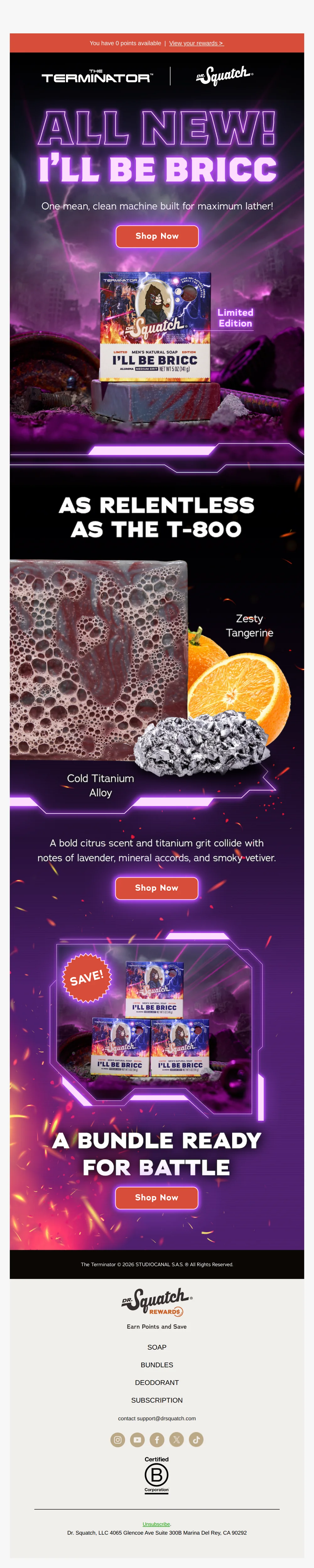
I’ll Be Bricc is HERE
Pattern: Terminator x Dr. Squatch limited edition soap collab.
Use it here: Use a strong creative reference to brief AI on hierarchy and mood, then give it your actual product facts, guardrails, and review criteria.
Open reference in new tab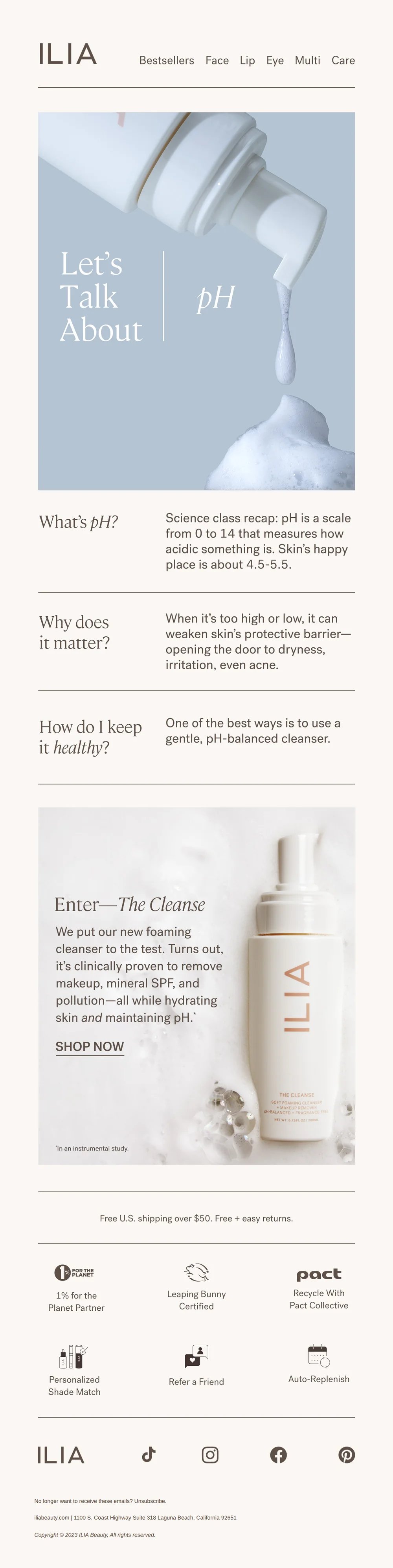
“Why does my skin’s pH matter?”
Pattern: teach skin pH science to sell new cleanser.
Use it here: AI can help draft an educational treatment, but your team still owns product substantiation, live-email accessibility, and final QA.
Open reference in new tabCreative and design curation only. These are role references, not reported revenue, conversion, or a promise that the exact tactic will transfer unchanged.
Need help implementing this?
We build and manage complete email & SMS programs for DTC brands. Get a custom plan for your brand.
Get Your Free Audit + Gameplan