Using AI to Design Emails Faster (Without the Slop)
Use AI to explore email creative faster without shipping generic work. Learn the ZHS process for keeping the brand, offer, and QA process intact.
- Build the creative system described in this lesson
- QA the design across production and rendering constraints
How fast can AI make email creative?
AI can speed up early creative exploration when the brand system, offer, and approval process are already clear. Use it to create several hero directions, choose the strongest with a human reviewer, then build the real email in Figma. Speed only helps when the team still decides what ships.
AI can reduce waiting in the image-concepting stage when the brand system and approval process are already defined. ZHS uses it for controlled assets such as hero shots and backgrounds, not as an unsupervised full-email generator. Build the final send in Figma using real brand styles, generate several viable concepts, test only the strongest candidates, and require human approval plus dark-mode and CTA QA before launch.
Faster concepting can help a team respond to a trending moment, a competitor launch, or a restock while it still matters.
But the same tool that hands you that speed will fill your sends with generic junk if you let it.
The difference is how you use it.
Rather watch than read? Here is the video version:
What should you use AI for in email design?
Use AI for two jobs: hero-image exploration and test velocity. It can create draft visual directions quickly, while the team still owns the brief, brand fit, product accuracy, and final approval. Generate several distinct concepts from a constrained prompt, then test only the candidates that clear review.
AI is one tool in the kit, not the whole belt. Point it at the right jobs and it earns its keep fast.
The clearest win is hero images and background visuals.
An image model can produce an early visual direction without waiting for a full production handoff. That does not make the first output production-ready: product details, composition, typography space, brand fit, and rights still need review.
The second win is test velocity.
Use one constrained prompt to create several genuinely different directions, then test the strongest candidates. The value of a faster workflow is not the number of images generated; it is more room to test distinct, on-brand concepts without skipping human judgment.
What should you use AI for in email design
- 01BriefLock the offer and angle
Decide the one customer action this email supports before a single pixel is made. AI cannot fix a weak angle.
- 02ExploreGenerate distinct hero directions
Use constrained prompts to create a small set of materially different concepts, then reject off-brand output.
- 03BuildAssemble the real email in Figma
Add the approved hero, copy, and CTA using the established brand styles.
- 04QABuild in Klaviyo and verify
Wire the CTA, check product facts and rendering, and test on representative devices before launch.
Structured from the canonical article steps for responsive reading and presenter mode.
Can AI design a whole email?
Do not delegate a complete email to an image or language model without human review. A strong send needs strategy, structure, copy that people actually read, testing, product accuracy, and brand alignment. AI output cannot verify those decisions on its own.
The trap is asking AI to do the parts it cannot do yet.
It will never tell you no. It just hands back something that looks fine and is quietly off-brand.
ZHS does not generate full emails for real client work without a human design and QA pass. The final email still needs strategy, structure, copy, testing, product accuracy, and brand judgment.
Point it at a whole layout and you get slop. Right colors, wrong feel, no taste. It reads generic the second it lands in the inbox.
It will confidently hand you an off-brand hero that clashes with your product photography and your voice. A human still has to look at it and say yes or no. That call is the whole job.
One small habit saves a lot of these assets. When a hero uses a PNG logo, outline it with a subtle white glow or border so it survives on a dark background. A logo that reads clean in your generation preview can go invisible the moment the inbox switches to dark mode.
Treat AI as a hero-shot and background tool today. Nothing more. The real email still gets built in Figma with real product photography and the premium design that converts.
How do you write a good AI image prompt for email?
Have the model help draft the prompt, then give it the brand site, product page, product copy, and hard constraints. Choose an aspect ratio and reserve intentional space for the headline and CTA. Vague input creates generic output.
AI is not the problem. Your prompt is.
The quality of your input equals the quality of your output, and most people skip the input entirely. They jump straight to image generation and get mediocre results.
The better move is to have ChatGPT write your prompt first.
Give it the brand site, product page, product copy, and hard constraints, then let it build the generation prompt. A useful constraint set names the canvas shape, product placement, lighting, background, exclusions, and the clear space reserved for the message.
Feed it specifics and it returns something usable. Feed it a vague one-liner and you get the same junk everyone else gets.
- Prompt built from real brand and product inputs
- Used for hero shots and backgrounds only
- Human picks the winner and kills the misses
- Final email built in Figma on brand styles
- Speeds a cycle that already has strategy behind it
- One lazy prompt, first result shipped
- Asked to design the entire email
- No human eye, no brand check
- Generic layout that reads AI-made
- Speed with nothing thought through behind it
How much time does AI-assisted email design save?
There is no universal time-saving claim. The impact depends on the brief, product photography, brand system, approval path, revision load, and the amount of production work required. Measure the current process before introducing AI, then compare like-for-like campaigns. AI can reduce concepting waits; it does not remove strategy, QA, or accountability.
What AI can and cannot speed up
| Criteria | Traditional handoff | AI-assisted starting point |
|---|---|---|
| Brief | Strategy and offer need a clear owner | Strategy and offer still need a clear owner |
| Hero direction | A designer begins from the brief | A reviewer selects from constrained draft directions |
| Brand and product review | Check fit, facts, and rights before approval | Check fit, facts, and rights before approval |
| Email build and QA | Build in the design and sending systems | Build in the same design and sending systems |
Measure elapsed time and quality with the same approval standards. AI should reduce waiting, not remove responsible review.
How do you keep AI emails on brand?
Anchor every AI hero inside your Figma brand system. Load brand colors, fonts, and spacing as styles so the generated image is one layer inside a controlled design, not the whole thing. Then check every send for dark-mode rendering and a clearly prioritized CTA. If a hero clashes with your product photography, it goes in the trash.
Speed is worthless if every send drifts.
The guardrail is your Figma system. Load brand colors, fonts, and spacing as styles, then AI heroes drop into a frame that is already on brand. The generated image is one layer inside a controlled design, not the whole thing.
Run every AI asset past the same question you would ask any designer: does this look like us?
If a hero clashes with your real product photography or your voice, it goes in the trash no matter how fast it came out. The tool gives you options. Your standards decide which one ships.
Two practical checks catch common drift.
Does it hold up in dark mode? A near-white asset, transparent logo, or low-contrast element can become unreadable in a dark inbox. Test the final message in representative dark-mode clients before it goes out. If a logo or key element vanishes, the asset is not done.
Does it protect the primary CTA? A fast AI hero can tempt you to add competing offers, loyalty messaging, or social prompts. Keep one clearly prioritized customer action in the first view and verify that the CTA remains readable and tappable.
What are the most common AI email design mistakes?
Common mistakes include asking AI to design the entire email, skipping prompt work, shipping the first result, omitting human review, and skipping a dark-mode test. Address them before the asset reaches a live send.
- Asking AI to design the whole email. Use it for hero shots and backgrounds. Build the real email in Figma with real assets.
- Skipping the prompt work. Have ChatGPT write your prompt from real brand inputs first. Vague input equals generic output.
- Shipping the first result. Generate several variations and select the strongest after review.
- No human eye on the output. AI has no taste. Someone on the team approves or kills every asset against the brand.
- Letting speed break consistency. Anchor AI heroes inside your Figma brand styles so faster sends stay on brand.
- Ignoring product photography. For a launch or sale, real product shots sell. AI backdrops support them. They do not replace them.
- Skipping the dark-mode check. Test every send in dark mode before it ships. A near-white AI hero can vanish in a dark inbox and take your logo with it.
- Crowding the first fold. Prioritize one customer action. Keep the AI hero, headline, and primary button easy to understand in the first view.
Get Expert Help
Our team uses an AI-assisted workflow to create and review on-brand campaigns for DTC brands. We scope performance expectations from the actual baseline, attribution model, offer, and operational capacity; AI is a production method, not a revenue guarantee. If you want its speed with the judgment and brand control required to ship responsibly, we can help.
Here is where to start.
More patterns to study
Curated creative references for this lesson. Study the mechanism, then adapt it to your own audience, offer, and evidence.
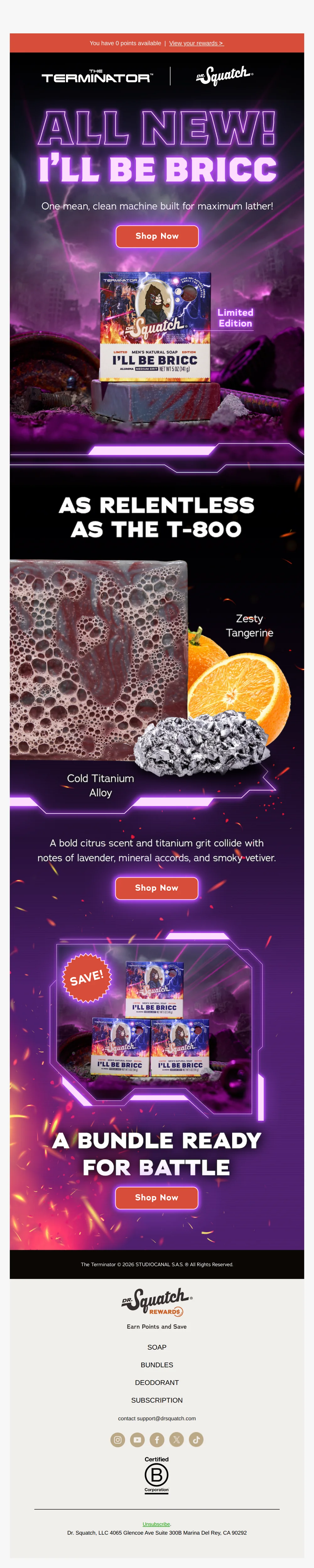
I’ll Be Bricc is HERE
Pattern: Terminator x Dr. Squatch limited edition soap collab.
Use it here: Use a reference to describe visual hierarchy and energy to AI, then replace every borrowed asset, claim, and product detail with approved brand inputs.
Open reference in new tab
“a little gothic foreplay.”
Pattern: Gothic Wuthering Heights collab for intimacy products.
Use it here: AI can help explore a narrative art direction, but it cannot decide whether a concept is on-brand, licensed, accessible, or ready for an inbox.
Open reference in new tabCreative and design curation only. These are role references, not reported revenue, conversion, or a promise that the exact tactic will transfer unchanged.
Need help implementing this?
We build and manage complete email & SMS programs for DTC brands. Get a custom plan for your brand.
Get Your Free Audit + Gameplan