How to Optimize Your Emails for Dark Mode
One in three subscribers reads in dark mode, and it can turn your logo invisible. Learn the design fixes that keep emails looking clean in every inbox theme.
- Build the creative system described in this lesson
- QA the design across production and rendering constraints
Why does dark mode break your emails?
Dark mode can break emails because inbox providers may invert or remap colors, causing logos, backgrounds, low-contrast text, and image edges to render differently. Adoption varies by device, mailbox, and audience, so do not apply a universal audience percentage; test because the failure is common and often invisible in the editor.
Dark-mode transformations can hide black logos, create glowing white boxes, and reduce text contrast. Use resilient logo treatments, avoid relying on pure white and black, group image slices deliberately, and test actual inbox renders. A browser extension is useful for an early preview but does not replace mailbox testing.
Dark-mode usage is material for many audiences, and most editors do not show every transformation an inbox can apply.
So a clean email turns into a mess the moment someone opens it at night. The logo you can't read. A weird amount of black space. Elements that just don't look right. It makes the whole email look terrible.
Nobody squints to figure it out. They click off.
Treat dark-mode QA as protection against avoidable rendering failures, not as a promised revenue lever. It preserves readability and brand trust for the portion of your audience using a dark interface; the actual share should be measured from your available client and device data rather than borrowed from a generic statistic.
Here is what this looks like in practice.
What actually breaks in dark mode?
Five things break most often: black logos vanish, white boxes glow, low-contrast gray text blends in, image crops show a black background behind them, and countdown timers built for a white background look terrible. All of it happens because providers invert and remap your colors, and you never see it unless you open the email in dark mode yourself.
Dark mode does not just dim your email. Inbox providers invert and remap your colors, and that is where the damage happens.
A black logo on a white block reads fine in light mode and vanishes into black in dark mode. A crisp white content box turns into a harsh glowing slab. Low-contrast gray text that looked subtle now blends into the background.
Image cropping is a sneaky one. A crop can look great in light mode, then in dark mode a black background shows up behind it and the crop suddenly looks way too tight and cheap. Same image, no premium feel.
Countdown timers are another trap. Most of them look terrible in dark mode because the timer image was built for a white background.
If you never open the email in dark mode yourself, you never see any of this. Your overall numbers look fine while a third of your readers get a mess.
The fastest way to check without a second device is the Dark Reader Chrome extension. Send a test to yourself, flip Dark Reader on, and you see exactly what a dark mode subscriber sees.
Do not trust that it renders. Open every email in dark mode on your own phone before it goes out. If the logo is gone or a box glows white, fix it first. This one habit prevents almost every dark mode problem.
How do you build an email that works in both light and dark mode?
There are two reliable builds. Mostly image-based means you design in Figma, slice it, and upload the slices, so the inbox provider cannot recolor anything. HTML text blended with images stays clickable and accessible but takes real testing per block. We prefer the image-based route for almost every email.
There are two reliable ways to build an email that survives both themes. Pick based on how much testing you are willing to do.
- Design the email in Figma or Canva
- Slice it into sections and upload to your platform
- Everything stays intact in light and dark
- Add plain text in the footer for deliverability
- More flexible and clickable
- Takes real testing and trial and error per section
- Check each block in both modes, Dark Reader makes this fast
- When done right, accessible and high-performing
The image-based route is our preferred solution, and it's what we do with almost all of our emails. We build the design in Figma, slice it up, and upload the slices into Klaviyo. That keeps the email intact exactly the way we designed it in both modes, and it stops text from resizing. A sliced design cannot be recolored by the inbox provider.
The blended route reads better and stays clickable. Gym Lifetime does this one well, with real formatted text sections next to images that hold up in both modes. But it takes a lot of testing, sending emails to your own inbox, and trial and error before it looks right.
How do you stop your logo disappearing in dark mode?
Your logo is the number one casualty. In dark mode a black PNG turns invisible, and a transparent version just blends into the background. Three fixes work: outline it with a white glow or stroke, use a color like gray that reads on both themes, or make it a full 600px image slice. The image slice sidesteps the problem entirely.
Your logo is the number one casualty, and a ton of brands mess this up. In dark mode, background colors invert. Black becomes white and white becomes black. So a black PNG logo simply does not show up.
Most brands react by uploading a transparent version, but that just blends into the background and disappears anyway.
Here is what actually works. Outline the logo with a white glow or stroke so it holds on any background. Or use a color that reads on both light and dark. Gray is a GREAT example, it shows up either way. The move we use most is making the logo a full image slice, 600 pixels wide, which sidesteps the whole issue.
Avoid pure black and pure white in your design. Pure white boxes turn into harsh, glowing slabs that strain the eye at night. Pure black backgrounds create dead zones where nothing separates cleanly.
Nudge toward off-white and near-black so the inversion has less room to do damage. Give text real contrast instead of relying on light gray that disappears the moment the theme flips.
Watch for inversion on anything you assumed was safe. Dark logos, dark icons, and thin dividers all get remapped. If it depends on a specific background color to be readable, it will break somewhere.
How do you stop dark mode from striping your email?
Group your image sections together instead of alternating image, text, image, text, which is the most common structural mistake and creates ugly stripes. Build spacing into the images themselves in Figma or Canva rather than dropping spacer blocks between rows, since a spacer can render as a random black stripe. Do that and the whole email reads as one clean piece.
How you stack your sections matters as much as the colors inside them.
| Do | Don't |
|---|---|
| Build spacing into your images | Use spacer blocks between rows |
| Keep the logo readable on any background | Assume a black logo shows on black |
| Test countdown timers in both modes | Trust that timers render everywhere |
| Group image sections together | Alternate image, text, image, text |
Alternating image and text rows is the most common structural mistake. It creates ugly stripes in dark mode because the image backgrounds and the recolored text rows fight each other.
Spacer blocks are the usual cause. Drop a spacer between two images and it can show up as a random black stripe in dark mode. Build your spacing into the images themselves instead, by adjusting image heights in Figma or Canva rather than adding spacers in Klaviyo. Do that and the whole email reads like one clean piece.
Footers break the same way. An unoptimized footer leaves the logo and the social icons impossible to read. Give the footer logo the same glow or outline treatment, and add real text from your About Us page for better deliverability. We skip social icons entirely, since we don't want people leaving the email to go scroll Instagram or TikTok.
Do plain text emails fix the dark mode problem?
Yes. Plain text emails look great in both modes by default because there is no design for the inbox provider to break. They also get amazing deliverability and act as a pattern interrupt that lifts opens, clicks, and conversions. You do not choose plain text or designed. You run both, and lean on plain text where a clean render and a personal voice beat visuals.
Here is the shortcut for all of this. Send more plain text emails.
They look great in both modes by default because there is no design for the inbox provider to break. They have amazing deliverability. And they act as a pattern interrupt, which lifts open, click, and conversion rates because the email reads like a note from a colleague or a friend.
You will never worry about a disappearing logo on a personal note or a last-touch cart email. We sprinkle these in between designed emails, and they always perform.
You do not choose plain text or designed. You run both. Use designed emails where the image sells, and lean on plain text where a clean render and a personal voice matter more than visuals.
What are the most common dark mode email mistakes?
The seven that cost the most: never opening the email in dark mode, a black logo with no fallback, pure white content boxes, alternating image and text rows, ignoring image crops, trusting countdown timers, and relying on light gray text. Each one breaks for the third of your list reading at night, and each has a fast fix.
- Never opening the email in dark mode. Test every send yourself on a phone, or flip on the Dark Reader Chrome extension before it goes out.
- A black logo with no fallback. Give it a white glow or stroke, use gray, or make it a full 600px image slice so it survives any background.
- Pure white content boxes. They glow harshly at night. Shift to off-white and near-black instead.
- Alternating image and text rows. It stripes in dark mode. Group images and build spacing into them.
- Ignoring image crops. A crop that looks clean in light mode can look cheap once a black background shows behind it.
- Trusting countdown timers. Most render badly in dark mode, so check them in both themes.
- Relying on light gray text. Low contrast vanishes when the theme flips. Give text real contrast.
Get Expert Help
ZHS treats light- and dark-mode rendering as a production QA requirement, not an optional design flourish. The team tests both before launch because a send can preserve its message and still lose trust when logos, backgrounds, or product imagery break in a dark inbox.
If you want emails that look clean in every theme instead of guessing what a third of your list sees, we can help.
More patterns to study
Curated creative references for this lesson. Study the mechanism, then adapt it to your own audience, offer, and evidence.
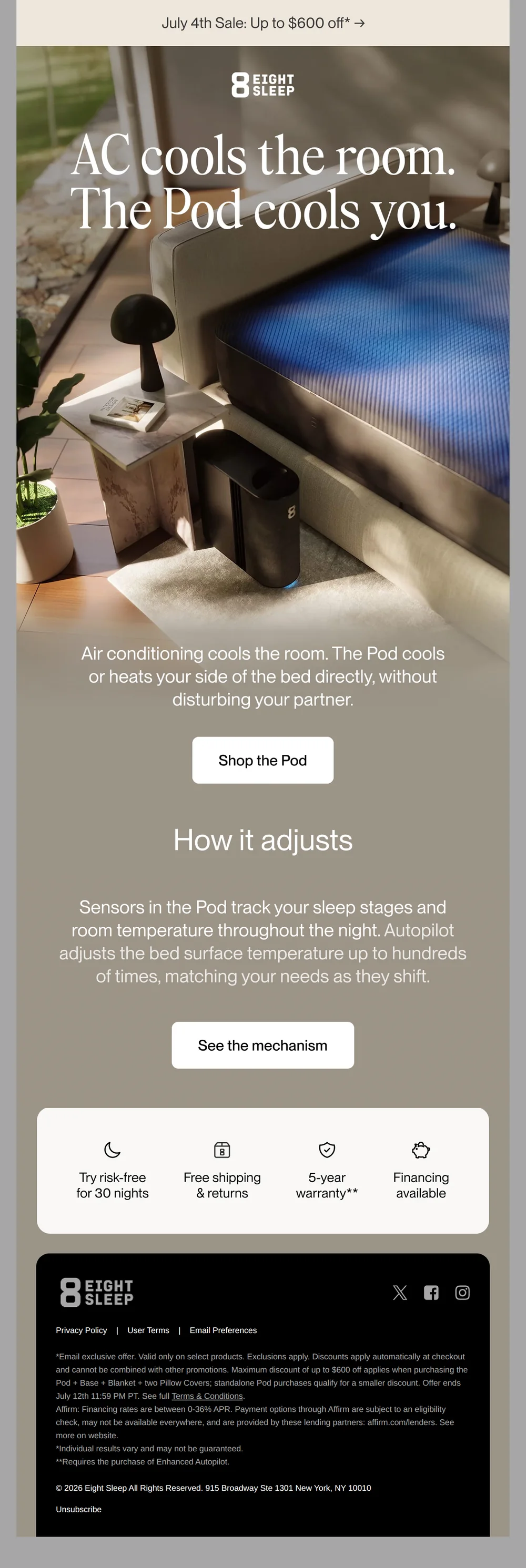
AC cools the room. The Pod cools you*
Pattern: AC cools the room, Pod cools you directly.
Use it here: A dark, product-led composition can still keep the benefit and action legible; test the received email instead of trusting a design preview.
Open reference in new tab
the maudern.
Pattern: Wuthering Heights x Maude gothic intimacy collab kit.
Use it here: Art direction can be intentionally dark and editorial, but essential copy, controls, and legal content must remain readable in actual inbox modes.
Open reference in new tabCreative and design curation only. These are role references, not reported revenue, conversion, or a promise that the exact tactic will transfer unchanged.
Need help implementing this?
We build and manage complete email & SMS programs for DTC brands. Get a custom plan for your brand.
Get Your Free Audit + Gameplan