Popups That Grow Your List Without Killing Conversion
Build and measure a clear, consent-aware popup that captures useful data and improves the quality of your email list, not just the raw signup count.
- Build the list-growth mechanism described in this lesson
- Measure signup quality as well as conversion rate
No prior lesson required.
Why does your popup matter so much for list growth?
Your popup is an important list-capture surface, but it is not the only one. It determines how many visitors enter, what consent was captured, and which zero-party data is available downstream. Optimize for qualified, usable subscribers, not the largest possible raw submission count.
Build the popup around a clear value exchange, a deliberate data question only when it will change the follow-up, and easy-to-understand consent. A multi-step pattern can be useful when it reduces friction or improves relevance; it is not automatically better. The ZHS operating ranges above are directional targets, and comparisons only mean something when the denominator is completed signups divided by eligible visitors shown the form.
Do not let a generic form be the only capture path. Pair the primary popup with purposeful embedded and footer capture, then measure the quality of each source.
Prefer to watch? Here is the full walkthrough.
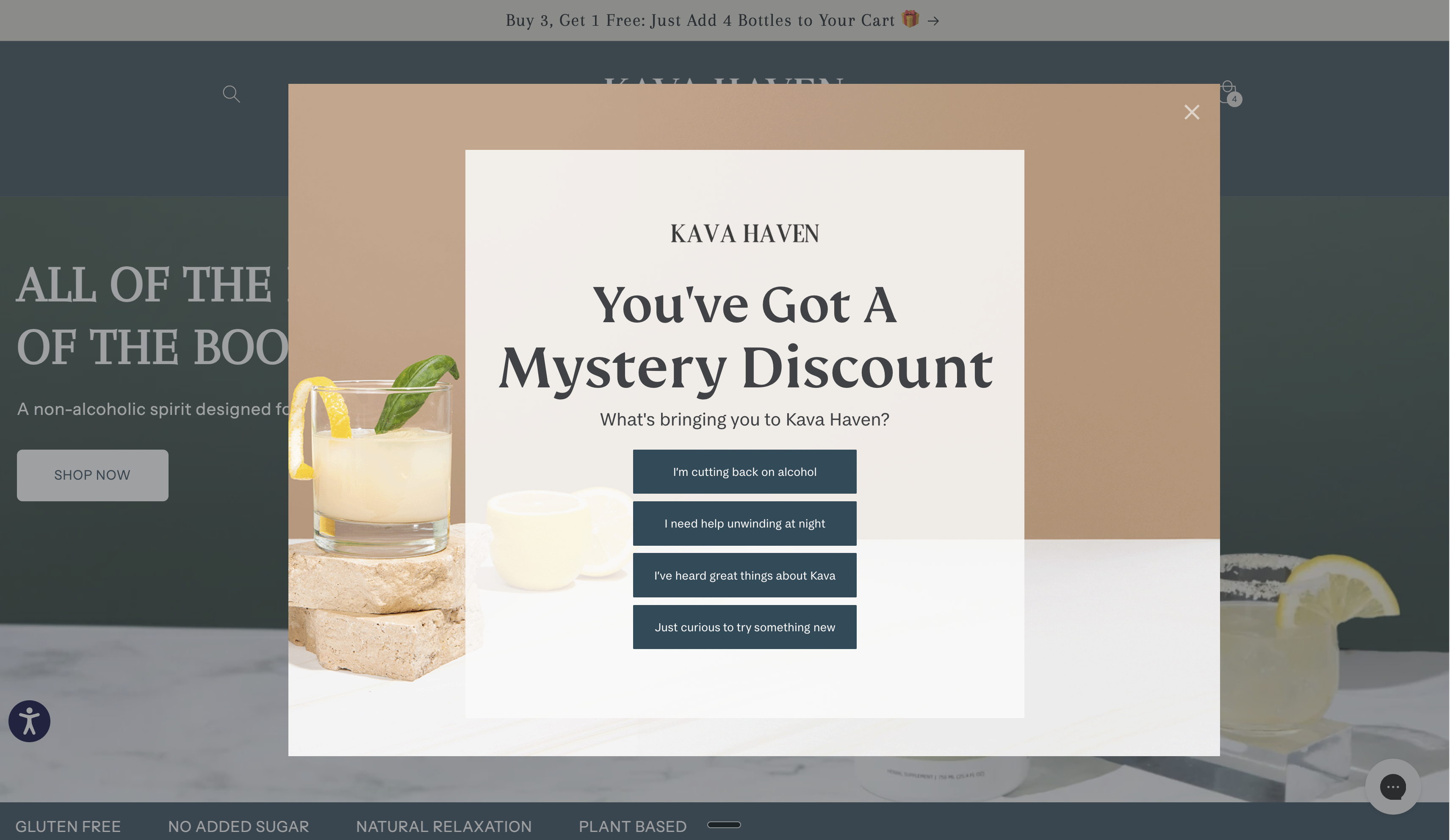
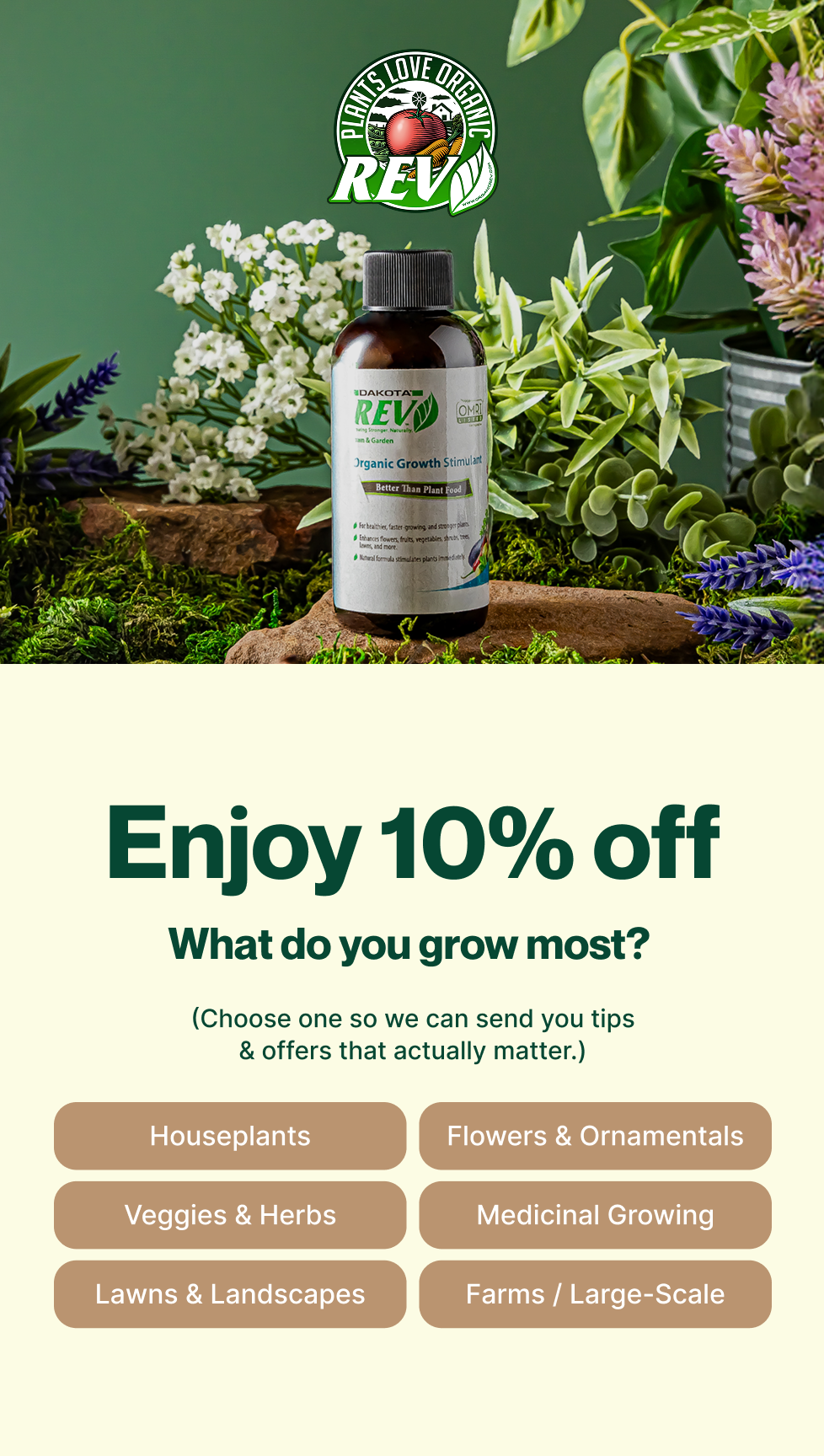
Are multi-step popups better than single-step?
Sometimes. A multi-step popup is worth testing when the first question gives the visitor a clearer value exchange or collects data that will genuinely change the welcome experience. A single-step form can be the better choice when the offer is already clear and every added step loses qualified completions. Compare them on matched traffic using the canonical signup-rate definitions above.
The moment someone is willing to engage can be an opportunity to learn what they want, but only ask for information you will use. If you want deeper preference data, a dedicated quiz funnel can serve a different job at greater depth.
Are multi-step popups better than single-step
- 01Entry tabTeaser
A compact entry point can invite a visitor to open the experience. Keep the copy on-brand and make it clear that the form can be dismissed.
- 02Step 1Preference question
Ask a concise question only when its answer will change the follow-up. Make skipping or declining clear where appropriate.
- 03Step 2Email capture
Collect only the information needed to deliver the promised value and create the appropriate email profile.
- 04Step 3Optional SMS capture
Use a distinct SMS step only when it has a clear value exchange and compliant, conspicuous consent language. Do not make SMS consent a condition of receiving the email offer.
- 05Step 4Success page
Confirm what the visitor requested, where to find it, and the next useful action.
Structured from the canonical article steps for responsive reading and presenter mode.
Use the stages as a starting pattern, not a fixed funnel. Separate desktop and mobile variants when the experience or data shows they need different layouts, targeting, or copy.
A clear value proposition and only the fields needed for the promised follow-up are better principles than a universal screen-size or step-count rule. Use the canonical ZHS operating range as a directional target, compare eligible visitors shown the form, and segment results by device and traffic source.
These popups are typically built in Alia, while your segmentation and flows live in Klaviyo, so the capture form and the email program are two connected pieces.
What does each popup stage need to convert?
Every stage has one job. Here is what the copy and design need at each step, from the teaser tab through the success page.
Teaser. Short and curiosity-driven. Light, on-brand, and native to the page so it feels like part of the site, not an ad dropped on top of it.
Preference question. One idea per question, with the headline built around your core offer. Ask only what will change the follow-up. Keep options scannable, use accessible tap areas, and make dismissal or skipping clear.
Email collection. Pair the promised value with a concise reassurance line. Collect the minimum information needed, use a clear CTA, and make the form accessible on the device in use.
SMS collection. Keep the value exchange distinct from email, collect explicit consent in clear, conspicuous language, and show the required disclosures. Offer a useful skip path.
Success page. A celebratory confirmation that shows the reward right away. Big headline, a very clear code, and a "Shop Now" CTA.
Nail these five stages and you have a form that earns its full-screen real estate. From there, the only job left is testing the offer, the timing, and the layout.
What is the best offer to put on a popup?
The best offer gives the right visitor a reason to subscribe now and can be fulfilled consistently. A discount can work, but it is not universally the right answer. If a discount does not fit the brand, use a MICRO solution: one small, specific resource that solves a relevant pain point and is easy to deliver.
No one wants to give you their email or their phone number. You have to give them a reason.
This is where almost everyone goes wrong. They slap together a generic offer nobody wants, then wonder why the list is not growing. The truth is simple: nobody wants more emails. They want something actually valuable.
A discount code can be a useful test. If a discount does not fit your brand, build what I call a MICRO solution: one small thing that solves one specific pain point for your ideal customer.
Sell skincare? The offer becomes "the three-minute morning routine that prevents breakouts" or "five ingredients to remove from your skincare routine today." Package it as a short PDF or video and give it away as the lead magnet.
Offer relevance is often a major lever, but it should be tested rather than asserted. For more examples of offers that actually get signups, start there.
| Offer type | Best use | What to validate |
|---|---|---|
| Discount | A price-sensitive first purchase when margin supports it | Completion quality, redemption, and whether it trains wait-for-sale behavior |
| MICRO solution | A specific education or utility need | Whether the resource is consumed and improves the welcome experience |
| Access or launch alert | A scarcity or belonging moment | Whether the expectation is real and the follow-up is timely |
Should you use a small popup or a full-screen one?
There is no universal screen-coverage rule. Use the format that gives the visitor a clear value exchange without blocking a useful task, then test it by device and traffic source. A larger focused experience can be appropriate for a strong offer; a smaller surface can be better for a secondary capture opportunity or a high-intent page.
Founders ask for a small corner popup all the time. "The big ones feel too pushy."
Here is the reality you are missing.
Once a visitor becomes an email subscriber, suppress the acquisition form and avoid asking for the same information again. Leave other relevant capture paths available only when they serve a different, consented purpose.
A design can produce a short-term signup lift while creating low-quality profiles, confusion, or a worse onsite experience. Pair completion rate with consent quality, device behavior, downstream engagement, and conversion context.
- Useful for a second chance, embedded capture, or focused page
- Needs a concise value exchange
- May be less disruptive for task-oriented visitors
- Can still collect a meaningful preference when justified
- Creates room for a stronger offer and explanation
- Can collect zero-party data when the answer changes follow-up
- Requires clear dismissal, accessible controls, and clean consent
- Must be measured against the simpler alternative
Small popups can be useful as a second-chance form, a slide-in after a dismissal, or an embedded capture in relevant content. A footer form can provide an always-available path. Treat each as a distinct source in reporting so it is clear which path adds qualified subscribers.
How does popup data improve your email flows?
Zero-party data can improve segmentation and flows when it is reliable, consented, and actually used. When a subscriber tells you what they want, you can route them into the appropriate welcome experience, show relevant products, and make later messages more useful.
The zero-party data you collect in step one is not a nice-to-have. It is the fuel for your email segmentation strategy and your flows.
When a subscriber tells you what they want, you can drop them into the right welcome flow, show them the products they care about, and personalize every send after that.
The welcome sequence is the payoff. It delivers the offer you promised, builds trust with a few value-based emails, then presents the logical next step, which is usually the first purchase. Feed it good popup data and every one of those emails gets sharper.
Before adding a question, document the profile property, allowed answers, default path, welcome-flow branch, and reporting view. If the answer does not change an experience or decision, do not ask for it.
What are good popup benchmarks?
Use the canonical ZHS ranges as directional context, then create an internal baseline for each form, traffic source, device, and audience. There is no single universal target for SMS opt-in, step count, or screen coverage.
Track this scorecard alongside the canonical benchmark cards:
- Completed signups divided by eligible visitors shown the form
- Consent state and source of consent by channel
- Device, landing page, traffic source, and form variant
- Welcome-flow delivery, engagement, and conversion for the captured cohort
- Exit, bounce, and onsite conversion context
What are the most common popup mistakes?
The biggest mistake is collecting data without a plan to use it. The rest are optimizing for raw submissions, hiding the value exchange, using unclear consent, forcing a single layout everywhere, and never revisiting the result.
- Asking a preference question with no downstream use. Keep the form shorter instead.
- Cramming unrelated requests together. Separate or defer information that is not required to deliver the promised value.
- Choosing size or format by taste. Test a visible, accessible experience against a simpler alternative.
- Using one design everywhere without reviewing data. Adapt when device or traffic behavior shows a meaningful difference.
- Setting and forgetting. Test the offer, timing, and layout on a deliberate cadence and record the learning.
- Hiding the close button or obscuring consent. Make exit controls and disclosures clear; a trapped visitor is not a qualified subscriber.
How do you grow SMS from your existing email list?
An SMS capture experience for existing email subscribers can be useful, but it is a separate consent journey, not an automatic next step. Target only the audience allowed to see it, make the value exchange distinct, and follow the appropriate jurisdictional and platform rules.
Choose the number and order of stages based on the information the profile already has and the consent you need to capture. Do not ask an existing email subscriber to provide the same email again unless there is a real correction or identification need.
Treat it as a measured add-on once the primary capture and welcome experience are working, not as a guaranteed high-conversion source.
Build the primary email capture and welcome experience first. Add an SMS-specific experience only when consent, message strategy, and reporting are ready to support it.
Get Expert Help
Our team builds consent-aware, measurable popups that feed useful data into the right lifecycle paths.
We build on Klaviyo when its segmentation and Shopify integration fit the account's requirements.
We handle the design, the split-testing, and the Klaviyo setup so your list grows without hurting sales.
More patterns to study
Curated creative references for this lesson. Study the mechanism, then adapt it to your own audience, offer, and evidence.

🍄Welcome, new friend! 🍄
Pattern: Happy Finnish founder unlocks Nordic wellness secret.
Use it here: Design the popup and first welcome email as one promise: the value offered at signup should be visible again when the subscriber opens.
Open reference in new tab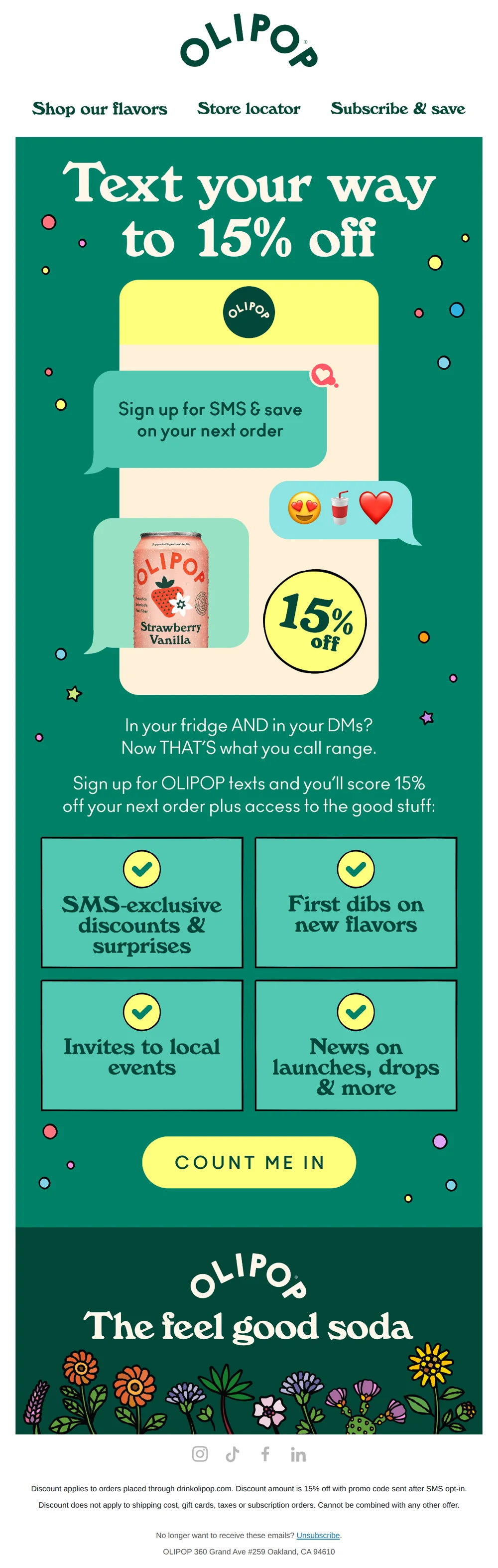
1-800-let's text📱👀
Pattern: Sign up for SMS, get 15% off instantly.
Use it here: Channel-specific incentives need channel-specific consent and clear terms; do not use a creative example to blur the consent boundary.
Open reference in new tabCreative and design curation only. These are role references, not reported revenue, conversion, or a promise that the exact tactic will transfer unchanged.
Need help implementing this?
We build and manage complete email & SMS programs for DTC brands. Get a custom plan for your brand.
Get Your Free Audit + Gameplan