Quiz Funnels: Capture Data Your Competitors Never Ask For
A good quiz turns a cold visitor into a subscriber who told you exactly what they want. Then every email you send can speak to that.
- Build the list-growth mechanism described in this lesson
- Measure signup quality as well as conversion rate
Why does a quiz beat a plain email field?
A quiz can be more useful than a plain email field when the recommendation is valuable enough to justify the extra friction. It can capture an email and the information a person deliberately shares about what they want. That information is zero-party data. It does not guarantee a signup rate or a purchase outcome; ZHS quiz operating guidance is to test whether the added data improves the recommendation, routing, and downstream customer experience enough to earn each extra question.
Many list-growth experiences ask only for an email at the popup that grows the list.
A quiz can ask for an email and a stated preference such as skin type, goal, size, concern, or occasion. Use only questions that relate directly to the product decision or a documented customer-service need.
Birthday can be relevant when a brand has a documented, consent-aware birthday program and a use for the field. The same rule applies to every question: only ask for it if you will use it. An unused field adds friction and data-retention responsibility without improving the experience.
That stated preference can become zero-party data with a clear value exchange and documented use.
A product quiz should ask only the questions needed to make a credible recommendation or a useful routing decision. Start with a compact version, keep each screen easy to understand, and request an email only when the visitor understands what they receive in return. If SMS is offered, make it a separate, optional, compliant consent choice. Before launch, map every answer to a concrete use in the welcome flow, recommendation, or campaign; then test completion, opt-in quality, answer usefulness, and downstream behavior against a simpler control.
What is zero-party data?
In this guide, zero-party data means information a customer deliberately shares because you asked for it and explained its use. It is not observed behavior or a purchased list. Answers such as "I have oily skin" or "I am shopping for a gift" can guide a recommendation or message, but they should be treated as stated preferences, not a permanent, complete picture of the person.
Third-party data is generally collected by another party and may be licensed or shared under separate terms. First-party data is what the brand observes directly: pages viewed, products clicked, and orders placed.
Zero-party data is different. It is what a customer tells you on purpose, in their own words, because you asked.
"I have oily skin." "I am shopping for a gift." "My goal is more energy, not weight loss."
You do not have to infer the stated preference from behavior alone. With clear disclosure, that answer can become a tag your email segmentation strategy can act on. Preserve the raw answer, document what each tag means, and give the customer room to update preferences rather than treating a single answer as forever true.
Behavior tells you what someone did. A quiz answer tells you what they said they want at that moment. Use both as context, and avoid treating either as permission to make unsupported assumptions.
How does a quiz capture data and recommend at the same time?
The same question set can do both jobs: the visitor answers to receive a recommendation, and a clearly disclosed answer can become a segment tag for an opted-in subscriber. Show the result, explain how the answer will be used, and feed only the useful tags into flows. The exchange should be transparent: a recommendation for the visitor and information the team will use to make later messages more relevant.
A useful product quiz recommends and captures only the information needed to support that recommendation and a documented follow-up.
The visitor should know they are getting a recommendation and that their answers may personalize future communication. Both sides of the exchange should be true and easy to understand.
Here is what the flow looks like in practice.
How does a quiz capture data and recommend at the same time
- 01Question setAsk what changes a decision
Ask about a goal, concern, or use case only when the answer changes the recommendation or a documented segment. Keep the choice clear enough to answer without interpretation.
- 02Value exchange and consentRequest contact details transparently
Explain what the visitor receives and how their answers will be used. Treat email and SMS consent separately, and make any SMS option voluntary and compliant.
- 03ResultShow the recommendation
Name the product or path and the reason it fits the stated answers. Give a clear next step and a way to revise the answer if it is wrong.
- 04After opt-inUse only the useful tags
Welcome flow, campaigns, and browse follow-up can use documented answers where they add relevance. Audit tags that do not change a message, recommendation, or service action.
Structured from the canonical article steps for responsive reading and presenter mode.
This quiz can be a "Mini Quiz" stage inside your full-screen popup, between the teaser and contact-details screen. Use the same questions, tags, and result logic across the experience so reporting stays interpretable. Make options easy to scan and tap, provide a clear dismiss path, and test the experience on a phone. Then review where people abandon, whether the answer changes the recommendation, and whether the added step earns its place.
What is the difference between a generic and a quiz-personalized welcome flow?
A generic welcome flow sends the same introduction to every subscriber. A quiz-informed flow can reference a stated goal, recommend a path connected to the answer, and focus on the concern the person selected. That creates a different message hypothesis; measure whether it improves relevance and business outcomes against an appropriate non-quiz or generic control.
Once documented tags are available in the ESP, a welcome flow can use them as one input to a more relevant message hypothesis.
- Same email to every new subscriber
- Product path based on broad or behavioral signals
- Copy written for a wider audience
- Reader may need to choose a path themselves
- Email built around their stated goal
- A product path connected to a stated answer
- Copy focused on the selected concern or use case
- A recommendation the reader can review or correct
The quiz-fed version is not merely a nicer template. It is a different message hypothesis, so evaluate it with a clear holdout or comparison: recommendation engagement, product exploration, conversion, unsubscribes, returns, and qualitative support feedback where available.
How many questions should a quiz funnel have?
Use the fewest questions that change the recommendation or create a useful segment. There is no universal optimal question count or completion threshold. Start with the minimum viable decision tree, then add one question only when the team can name the recommendation, segment, or service action it changes. Compare each version on completion, opt-in quality, answer distribution, and downstream performance before keeping the added friction.
Every extra question can introduce friction. The trade-off is between a simpler path and data that has a documented downstream use.
The ZHS test rule is simple: if a question does not change the recommendation, a useful segment, or a service action, cut it. Keep prompts and choices clear enough to be answered without explanation, and test the form on the device most visitors use.
You are not building a survey. You are building the shortest path from cold visitor to subscriber who told you what they want.
| Quiz design | What to test | Keep it when |
|---|---|---|
| Minimum viable decision tree | Can a visitor reach a credible recommendation? | Each answer changes the result or routing |
| One added question | Does the additional answer improve a later action? | It improves a documented recommendation, segment, or service path |
| Higher-friction version | Where do visitors abandon and what do they receive in return? | The added data has measurable downstream value |
| Survey-like version | Is the form collecting curiosity rather than useful data? | Rarely; remove questions with no operational use |
Every added screen is another decision. Ask only what you will use in a recommendation, a documented segment, or customer service. Curiosity is not a sufficient reason to retain a question.
What are the most common quiz funnel mistakes?
Common mistakes are asking questions you never use, requesting contact details before explaining the value exchange, ignoring tags after signup, adding untested friction, showing a generic result, and treating SMS consent as required.
- Asking questions you never use. If an answer never changes a recommendation, segment, or service action, it is friction with no documented payoff. Cut it.
- Requesting contact details before the value exchange is clear. Explain the result the person will receive and how answers will be used before asking for an email.
- Ignoring tags after signup. Zero-party data sitting in a field does nothing. Wire documented, useful answers into the welcome flow and campaigns, then periodically retire unused tags.
- Adding steps without a test. Treat every new screen as a hypothesis. Compare it with a simpler version and keep it only if the data it produces has downstream value.
- A generic result. "Here are our products" is not a recommendation. Name a path and the reason it relates to the visitor's stated answers, with a way to correct the result.
- Treating SMS as mandatory. If SMS supports the experience, offer it as a separate optional, compliant consent choice and link it to a useful SMS marketing program.
Get Expert Help
Our team builds quiz funnels that recommend the right product and quietly segment every subscriber on the way in, then wires those answers into flows that read like they were written for one person. If you want a quiz that grows the list and feeds the whole email program, we can build it.
More patterns to study
Curated creative references for this lesson. Study the mechanism, then adapt it to your own audience, offer, and evidence.
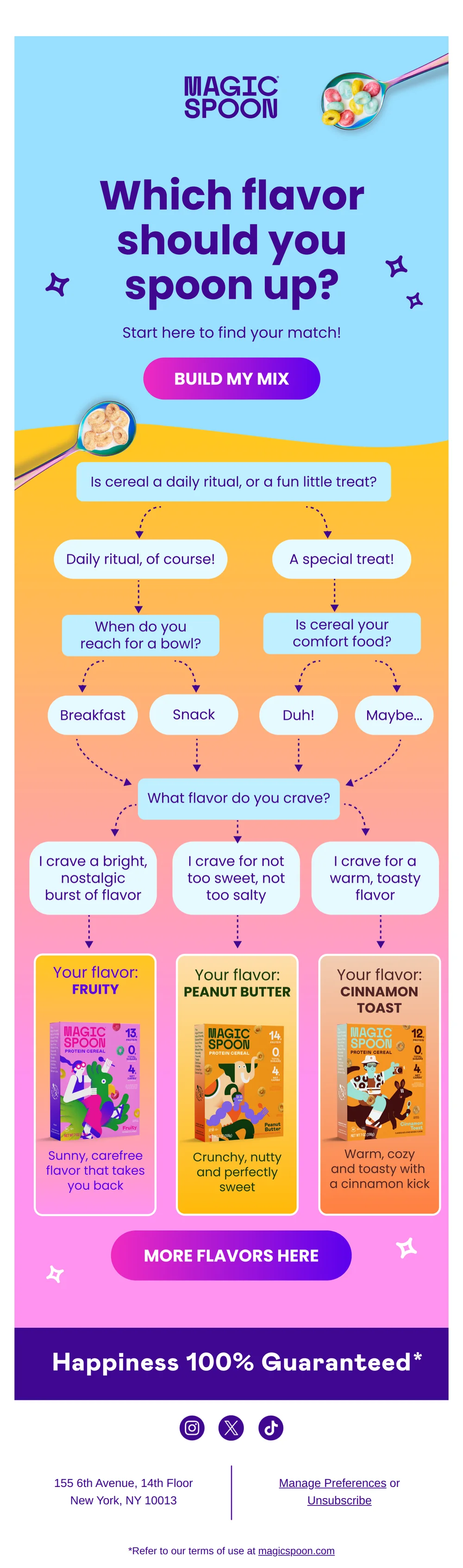
Which Magic Spoon flavor are you? 🤔
Pattern: Interactive flavor quiz helps you find your match.
Use it here: A visual quiz can make product discovery feel lighter, but each answer needs a clear downstream product, segment, or educational decision.
Open reference in new tab
Pop Quiz: Is Your Protein Bar Actually Good? 🧪
Pattern: quiz-style test helps you choose smarter protein bar.
Use it here: Use a quiz to help the customer evaluate a real choice, then state what data is captured and how it changes the experience.
Open reference in new tabCreative and design curation only. These are role references, not reported revenue, conversion, or a promise that the exact tactic will transfer unchanged.
Need help implementing this?
We build and manage complete email & SMS programs for DTC brands. Get a custom plan for your brand.
Get Your Free Audit + Gameplan