The Browse Abandonment Flow: Recover Silent Shoppers
Browse abandonment emails catch shoppers who viewed products but never added to cart. Learn the triggers, timing, and messaging that turn browsers into buyers.
- Build the trigger, timing, branches, and exits for this flow
- Measure and improve the flow against a stable cohort
What is a browse abandonment flow, and why does it matter?
A browse abandonment flow is an automated message sequence for identifiable shoppers who viewed a product page but did not progress to cart or checkout. It gives the brand a chance to answer the product question that may have stopped the next action, without treating a research visit like a cart recovery.
Browse abandonment is only as useful as the quality of product-view tracking, identity resolution, catalog data, and suppression logic behind it. It can be a large eligible audience, but it is not automatically the largest or most valuable opportunity for every store.
Use a product-view event, stop the journey when the shopper moves into cart, checkout, or purchase, and begin after a short relevance-preserving delay. The flow map below is a ZHS starting configuration: it separates new and returning purchasers, starts with help rather than a reflexive offer, and uses channel-specific consent and pressure rules. Calibrate the cadence, re-entry, and offer to the catalog and buyer behavior rather than copying a universal sequence or revenue range.
Here is what it looks like in practice.

What is the difference between browse and cart abandonment?
A browse abandoner viewed a product page without a cart add, which often indicates a different question from a cart abandoner who selected items. Browse copy can answer "is this right for me?" with product detail and social proof. Cart copy can focus more directly on the items chosen and remaining checkout friction, which is the job of your abandoned cart recovery flow.
Treating these as the same flow is the fastest way to look pushy.
A browse abandoner viewed a product page. That is it. No cart add, so their intent is lower and their hesitation is higher.
- Viewed a product page, no cart add
- Lower intent, still researching
- Needs help, not pressure
- Lead with the product and social proof
- Added to cart, then left
- Higher intent, closer to buying
- Needs a reminder and friction removal
- Recover the exact items they chose
Lower intent means your copy has to earn the click. You are answering "is this right for me?" not "did you forget something?"
How do you set up a browse abandonment trigger?
Use the product-view event your platform reliably sends. In the ZHS starting configuration, profile filters remove a shopper once they add to cart, begin checkout, place an order, or can no longer receive the selected channel. Set re-entry from the purchase cycle and browse frequency, then test it against actual overlap and pressure data.
- Trigger on: Viewed Product
- Filter out: anyone who added to cart, started checkout, or placed an order since starting the flow
- Re-entry: document the purchase-cycle and browse-frequency rule before enabling it
- Has: a known email or a marketing subscription
Browse tracking only works for shoppers your platform can identify, usually because they clicked an email, signed up, or bought before. Anonymous visitors will not trigger the flow, so volume grows as your list grows.
How many emails should a browse abandonment flow have?
There is no universal number of browse messages. The ZHS map below starts with a brief delay, separates people by relevant purchase context, and stops the promotional path when a higher-intent event occurs. Its later-message and offer decisions are deliberately conditional: an offer belongs only where the economics, consent, and prior behavior support it.
Because a browser only viewed a product and never added to cart, this is a lighter-touch version of your cart flow. Same skeleton, softer copy.
View full build
Read the text version
Trigger: When someone Viewed Product
Entry filters: Viewed Product; Has not added to cart or started checkout; Can receive email marketing
Exit conditions: Added to Cart after entering; Started Checkout after entering; Placed Order since entering
Re-entry: Allow re-entry after 30 days
- delay: Wait 30 minutes
- Conditional split: Placed Order at least once over all time
- Yes · Returning customer
- email: Email 1ASimple reminder, viewed an item but did not check out
- sms: SMS 1ASimple reminder
- delay: Wait 1 day
- email: Email 2AStill unsure? Reassurance
- sms: SMS 2AReminder + trust signal
- delay: Wait 1 day
- email: Email 3AFAQs answered, maximize experience
- No · New purchaser
- email: Email 1BSimple reminder, solve #1 objection
- sms: SMS 1BSimple reminder
- delay: Wait 1 day
- email: Email 2BStill unsure? Reassurance
- sms: SMS 2BReminder + discount mention
- delay: Wait 1 day
- email: Email 3BFAQs answered
- Yes · Returning customer
- delay: Wait 2 days
- email: Email 4Why did you not purchase?
What should a browse abandonment email say?
Lead with the exact product they viewed and resolve the question that may have stopped the cart add: fit, sizing, materials, shipping, returns, or confidence. Use genuine reviews and ratings where they help. Treat an offer as a deliberate test with a margin and behavior rationale, not as the automatic first answer.
The ZHS writing default is helpful before pushy: lead with the product they viewed and the decision information it lacks, not a hard sell.
- Show the product. Dynamic image and title of what they viewed. Recognition drives the click.
- Address the hesitation. Fit, sizing, materials, shipping, returns. Answer the silent question.
- Use social proof. Reviews and ratings do more than adjectives ever will, and a review request flow keeps that proof fresh.
- Make an offer deliberately. The ZHS starting configuration holds the first message to product help, then considers an offer for a selected new-purchaser path only when the economics and customer experience support it.
- Answers "is this right for me?"
- Leads with the exact product they viewed
- Reviews and ratings answer the hesitation
- Helpful tone; offer only when the decision supports it
- Answers "did you forget something?"
- Recovers the exact items they chose
- Removes whatever friction stopped checkout
- Reminder first, urgency later
A first-message offer can solve a real price objection, but it can also create margin leakage or an expectation to wait. Start with the product question; introduce an offer only on a documented path with a testable reason.
How do you stop browse emails from overlapping with other flows?
Profile filters do the heavy lifting. The ZHS starting configuration excludes anyone who adds to cart, starts checkout, or places an order after entering, then moves them into the more appropriate journey. Add frequency governance so recent messages do not stack across channels or flows.
Overlap is what makes browse flows feel spammy.
Set clear handoffs so the shopper receives the next most relevant message rather than duplicate sales pressure.
| Situation | Rule |
|---|---|
| They add to cart mid-flow | Profile filter pulls them out, cart abandonment takes over |
| They start checkout | Profile filter pulls them out, checkout abandonment takes over |
| They place an order | Profile filter removes them from the flow |
| Recent browse email sent | Add a frequency cap so they do not get stacked sends |
How should you measure browse abandonment?
There is no canonical browse-abandonment outcome range registered here. Measure the flow against comparable traffic, products, audience sources, and attribution settings instead of treating a broad industry number as a promise. Use a stable denominator and keep tracking coverage visible: anonymous visitors and untracked product views are not eligible flow entries.
| Measure | Question it answers | Read it with |
|---|---|---|
| Eligible-view coverage | Are meaningful product views becoming identifiable entries? | Tracking, consent, and catalog health |
| Product return visits | Did the message bring shoppers back to the viewed product? | Product availability and message relevance |
| Purchases | Did the eligible cohort buy under a consistent attribution rule? | Margin, discount exposure, and inventory |
| Negative signals | Is the flow creating unwanted pressure? | Unsubscribe, complaint, reply, and overlap trends |
Use the KPI guide to keep definitions stable before comparing one cohort with another.
What are the most common browse abandonment mistakes?
The five that cost the most revenue: treating it like cart abandonment, firing on every page view instead of a product view, running no suppression rules, leading with a discount, and skipping social proof. Each one either annoys your list or trains shoppers to wait for a coupon.
-
Treating it like cart abandonment. Lower the pressure and lead with help, not urgency.
-
Firing on generic page views. In the ZHS configuration, use a reliable Viewed Product event rather than a generic page view, then validate event quality before relying on it.
-
No suppression rules. Cart, checkout, and purchase events should ordinarily hand the shopper into the more relevant journey instead of leaving a duplicate browse message active. This is the kind of leak a flow audit checklist catches.
-
Leading with a discount. You train people to wait and you erode margin on buyers who would have paid full price.
-
Skipping social proof. Reviews answer the hesitation that stopped the add-to-cart in the first place.
Technical Checklist
Triggers:
- Viewed Product event is confirmed from the live storefront
- First-delay rationale is documented against session behavior and pressure rules
- Conditional split uses the documented purchase-context definition
- Re-entry rule is calibrated to purchase cycle and browse frequency
Exclusions:
- Profile filters exclude Added to Cart, Started Checkout, and Placed Order, all since starting the flow
Content:
- Dynamic viewed-product block pulls correctly
- Reviews block populated
- Any discount path has an approved margin, behavior, and eligibility rationale
Get Expert Help
Browse abandonment is one of the flows our team builds, tests, and tunes for DTC brands.
We handle the triggers, suppression logic, design, and copy so the flow adds revenue without annoying your list.
More patterns to study
Curated creative references for this lesson. Study the mechanism, then adapt it to your own audience, offer, and evidence.

winter kits for every body.
Pattern: blurred product kits revealed by personality type.
Use it here: Help a browsing customer recognize the product path that fits them instead of treating every viewed item as an identical urgency event.
Open reference in new tab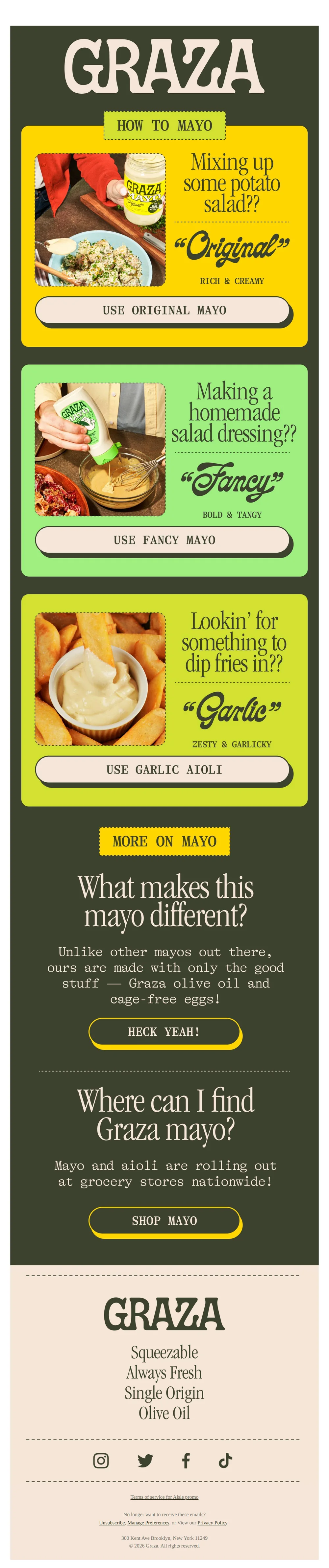
Choose your fighter (mayo)
Pattern: match the right mayo to every dish.
Use it here: A simple selection tool can turn a broad catalog into a useful decision; use actual browse or preference data when it changes the recommendation.
Open reference in new tabCreative and design curation only. These are role references, not reported revenue, conversion, or a promise that the exact tactic will transfer unchanged.
Need help implementing this?
We build and manage complete email & SMS programs for DTC brands. Get a custom plan for your brand.
Get Your Free Audit + Gameplan