Subject Lines That Get Opened (Without Clickbait)
Your subject line decides whether the rest of your email gets read. Learn the formulas, length, and preview-text tactics that lift open rates for DTC brands.
- Write the message using the framework in this lesson
- Evaluate the copy against one clear customer action
Why does the subject line matter so much?
The subject line and preview text are the first message a subscriber sees in the inbox. Their job is to make the next action clear enough to earn attention without overstating what the email contains. Treat the open as a gateway metric, not the outcome by itself.
Nobody reads your email if they never open it.
Together, the subject line and preview text do that inbox job. Make the promise clear so the rest of the email gets a fair chance.
Write a concise, front-loaded subject that still makes sense when an inbox cuts it short. Rotate curiosity, benefit, specific proof, real urgency, and personalization only when the underlying message supports the angle. Treat preview text as an extension, not a repeat. Never mislead for an open; test one variable at a time and decide the evaluation rule before you send.

How long should a subject line be?
There is no universal character count. Truncation changes by inbox, device, font, language, and sender display. Put the most useful word first, preview the message on representative inboxes, and make sure the visible portion can stand on its own.
Put the useful information first. "Sale ends tonight" is easier to understand at a glance than "We wanted to let you know that our sale is ending soon." The reader sees the reason before the app truncates the line.
- What the phone shows: "We wanted to let you know that our sa..."
- The offer sits past the cutoff
- Reader sees nothing worth opening
- What the phone shows: "Sale ends tonight"
- The useful part appears first
- The whole hook survives the cut
Read your subject line as just the visible portion. If the first four words do not earn the open, rewrite them.
What subject line formulas actually work?
Use a small set of angles rather than a long list of formulas: curiosity, benefit, specificity, real urgency, and personalization. Specificity often gives the reader a clearer reason to open than a vague announcement. Match the angle to the send, so curiosity fits content, urgency fits a real deadline, and personalization fits an abandoned cart.
You do not need a hundred formulas. You need five you can rotate.
- Curiosity: "The one thing your skincare routine is missing"
- Benefit: "Softer skin by next week"
- Specificity and numbers: "3 recipes using your new blend"
- Urgency, only when real: "Ends at midnight"
- Personalization: "Sarah, your cart is still waiting"
Specificity often beats vague. "Big news inside" says little; "Your favorite hoodie is back in your size" gives the reader a real reason. Personalization works best when it pulls from real behavior, like the products someone left in your abandoned cart recovery flow.
Curiosity fits a content email. Urgency fits a sale deadline. Personalization fits an abandoned cart. Using the wrong angle for the moment reads as noise.
What should preview text say?
Treat preview text as a second subject line that adds a reason to open, not a footnote. The two biggest mistakes are repeating the subject and letting your email pull in "View in browser." Both waste the strongest real estate you have. Extend the subject instead, so if it asks a question, the preview starts the answer.
Preview text is the gray line next to or under the subject. Treat it as a second subject line, not a footnote.
The common mistake is repeating the subject, or letting your email pull in "View in browser" as the preview. Both waste the strongest real estate you have.
Extend the subject instead. If the subject asks a question, the preview starts the answer.
- Subject: "Your order shipped"
- Preview: "Your order shipped"
- Repeats the subject and adds nothing
- Subject: "Your order shipped"
- Preview: "Track it here and see what pairs with it"
- Adds a reason to open
Should you use emojis in subject lines?
Test it, do not lean on it. An emoji can help a subject stand out in a crowded inbox, or it can make you look like every other promo. It depends on your list, so run the test rather than guess. One rule holds across every brand: never use an emoji as a crutch for a weak line.
An emoji can help a subject line stand out in a crowded inbox. It can also make you look like every other promo. It depends on your list, so test it.
One rule holds across every brand: never use an emoji as a crutch for a weak line. If the words do not work without it, the emoji will not save them.
Does clickbait hurt your email deliverability?
Yes. A misleading subject like "Re: your refund" on a promo may win a moment of attention while damaging trust in the sender. Do not treat an open as a successful outcome if the inbox promise does not match the email. Complaints and negative recipient response are sender-health signals worth monitoring.
You can write a subject that gets a huge open rate and destroys your program.
"Re: your refund" on a promo email may create attention by implying something the email does not deliver. That is not a reliable basis for a long-term sender relationship.
A fake open is not a useful win. Monitor complaints and engagement alongside click and conversion behavior, which are part of the broader reasons emails land in spam.
Honesty is not just ethics here. It is deliverability.
How do you A/B test a subject line?
Change one variable at a time, length, angle, or emoji, so the result can be interpreted. Split a real audience, define the primary outcome and decision rule before sending, and do not call an early, small difference a winner. Small lists may need repeated comparable tests before a pattern is credible.
Testing is how you replace opinions with data. Do it properly or the result means nothing. For the full method, see our guide on how to A/B test your email.
How do you A/B test a subject line
- 01SetupChange one thing
Test length, angle, or emoji. If you change several variables, you cannot identify the cause.
- 02SendUse a real comparable audience
Set the audience, primary outcome, and decision rule before the send.
- 03ReadRequire a repeatable signal
Do not call a small early difference a winner. Repeat comparable tests when the audience is small or the result is uncertain.
Structured from the canonical article steps for responsive reading and presenter mode.
What are good subject line examples?
Rewrite vague lines into specific ones. "We have some exciting news" becomes "Your size is back in stock," and "Don't miss out on our sale" becomes "Sale ends at midnight." A strong rewrite gives a real product, benefit, or deadline instead of a generic announcement.
| Before | After | Why it works |
|---|---|---|
| We have some exciting news | Your size is back in stock | Specific, personal, real reason |
| Newsletter update | Ways to style the new drop | Specific and useful |
| Don't miss out on our sale | Sale ends at midnight | Concrete deadline |
| Check out our new products | The blend everyone asked for | Curiosity plus social proof |
| Thank you for your purchase | Your order ships tomorrow, here's what's next | Extends into a benefit |
What is a good email open rate?
There is no portable "good" open rate. Privacy features, mailbox reporting, audience source, message type, and the platform's measurement rules can all change it. Read opens as a directional trend inside one program, then pair them with clicks, conversions, unsubscribes, and complaints. The sender-health guardrail below is the canonical one to act on.
| Metric | Needs Work | Good | Excellent |
|---|---|---|---|
| Campaign open rate | Confirm the reporting definition | Compare similar audiences and send types | Pair with downstream behavior |
| Automation open rate | Check entry source and message timing | Compare equivalent trigger cohorts | Pair with conversion and complaints |
| Spam complaint rate | Use the canonical provider-aware guardrail | Track the trend by source and send | Investigate before sender health deteriorates |
The canonical card above separates a provider-level ceiling from ZHS's operating target, so an internal aspiration never gets mistaken for an industry-wide rule.
Read open rate as a trend on your own list, not an absolute truth, and pair it with the email and SMS KPIs that actually matter.
What subject line mistakes should you avoid?
Writing only for desktop, repeating the subject in the preview, chasing opens with clickbait, testing several variables at once, calling a winner too early, and being vague can all make the inbox promise less useful. Each is fixable in the next send.
- Writing for the desktop. Test on a phone, where truncation and tap targets are easier to miss.
- Repeating the subject in the preview. Use the preview to add a reason, not to echo the line above it.
- Chasing opens with clickbait. A misleading subject can create attention while eroding trust in the sender.
- Testing two things at once. Change one variable per test or the data tells you nothing.
- Calling a winner too early. Wait for enough opens before you trust the result.
- Being vague. Replace "Big news" with a specific product, concrete benefit, or real deadline.
Get Expert Help
Our team writes and tests subject lines for DTC brands, using program data to distinguish useful angles from noise.
If you want a program built on real testing instead of guesswork, we can help.
More patterns to study
Curated creative references for this lesson. Study the mechanism, then adapt it to your own audience, offer, and evidence.
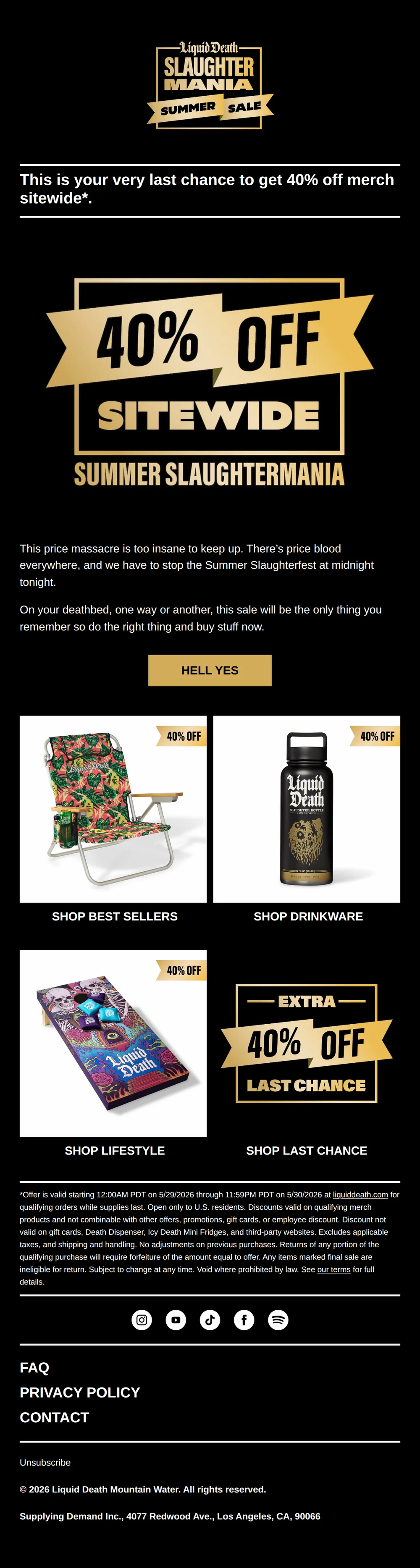
Do you hate money?
Pattern: Last chance: 40% off in darkly comic style.
Use it here: An unusual subject can earn attention when the body immediately pays off the tone; never let novelty disguise a false deadline or offer.
Open reference in new tab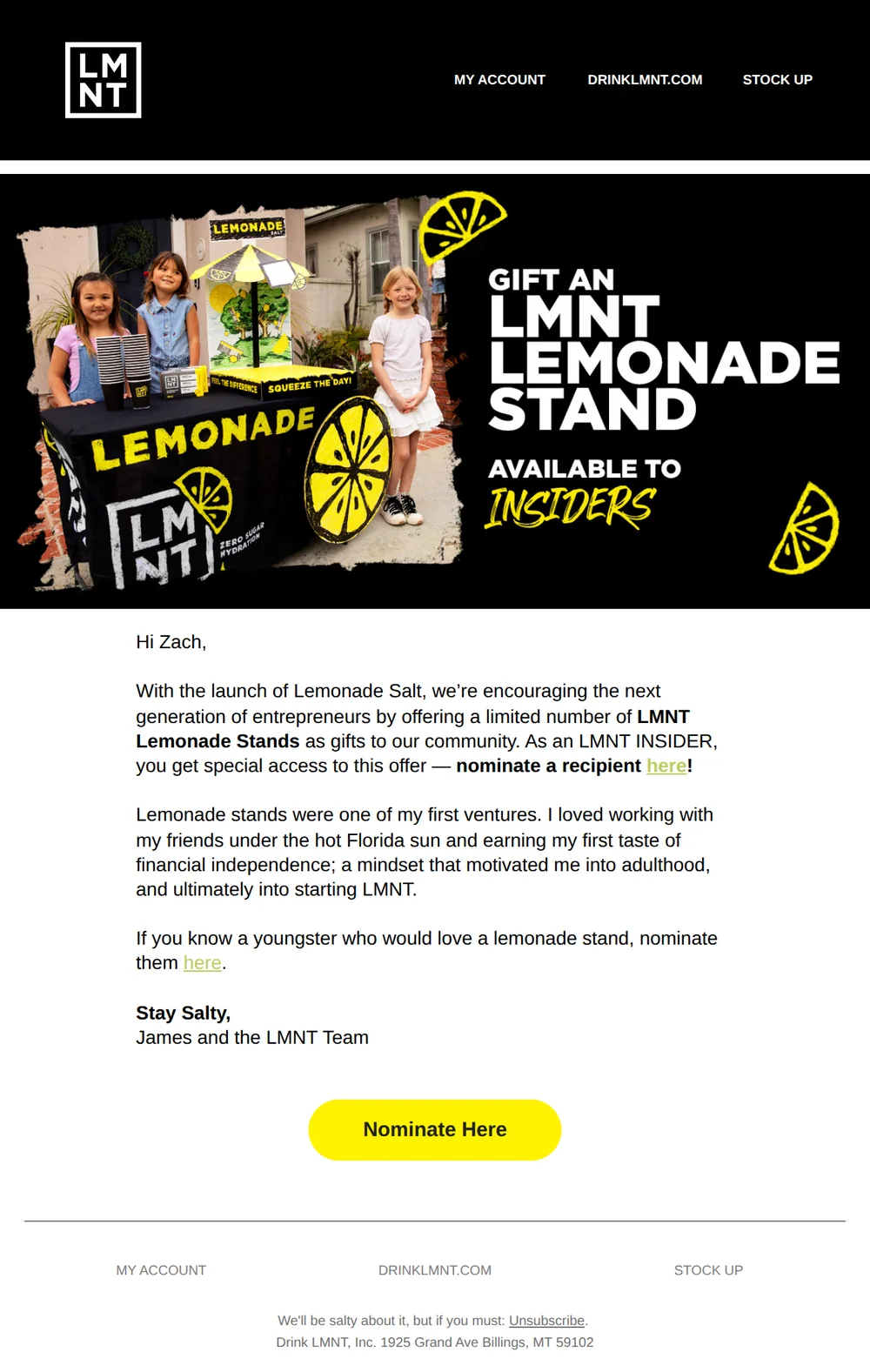
Nominate an LMNT Lemonade Stand Recipient
Pattern: Gift a real lemonade stand to a young entrepreneur.
Use it here: A subject can be specific without being mechanical when it names a concrete action or community moment the recipient can understand quickly.
Open reference in new tabCreative and design curation only. These are role references, not reported revenue, conversion, or a promise that the exact tactic will transfer unchanged.
Need help implementing this?
We build and manage complete email & SMS programs for DTC brands. Get a custom plan for your brand.
Get Your Free Audit + Gameplan